copy-on-write git worktrees · macOS and Linux

Worktrees, ready in a second.

Dependencies, dev shell and local files: already there in every new git worktree. For you, and every agent you run.

brew install pierre-borckmans/tap/clove
~/src/mono
❯ clove new feat/login
✓ clone image 0.00s
✓ mount 0.70s
✓ checkout 0.21s
· setup direnv unchanged
· setup pnpm unchanged
● feat-login ready in 1.0s
git worktree + setup72s · 3.1 GB
clove new1.0s · 6 MB
70× faster, 500× less disk
fan · idledisk · +6 MB

the problem

A few agents, one checkout.

Every agent works on its own branch. In one checkout, one switches branches under another, and your login fix lands on another agent's branch.

claude
wants feat/login
claude
wants agent/parser
~/src/mono · the only checkout
HEAD → fix/race
codex ❯ git checkout fix/race
✗ claude's login fix, now on codex's fix/race
codex
wants fix/race
cursor
wants agent/docs

the fix git already has

One worktree per branch, one folder each.

git worktree add gives every branch its own folder, all sharing one repository. Each agent works in its own, and nobody switches branches under anyone. A new one takes about a second.

"Duh. I'm not a caveman."
~/src/mono
❯ git worktree add ../feat-login -b feat/login
Preparing worktree (new branch 'feat/login')
HEAD is now at c9483ee feat(api): rate limits per team
✓ ready in 0.9s
~/src/mono
main
you
~/src/feat-login
feat/login
claude
~/src/fix-race
fix/race
codex
~/src/agent-parser
agent/parser
claude

but

git worktree add starts empty.

A fresh worktree has the tracked files and nothing else: no dependencies, no dev shell, and none of your local files.

~/src/feat-login
❯ make dev
sh: next: command not found
ModuleNotFoundError: No module named 'fastapi'
protoc: command not found
· a tumbleweed rolls by
✗ dependencies
node_modules · .venv · target/
✗ dev shell
nix · mise · direnv
✗ local files
.env · certs · local config

so your agent improvises

Reinstall everything, or hack around it.

It reinstalls in every worktree, or gives up and reaches back into your main checkout. And the next agent rediscovers all of it, from scratch.

claude · feat/login
● This worktree has no dependencies. Setting it up first.
❯ pnpm install 31sREINSTALL
❯ direnv allow && nix develop 41sREINSTALL
✗ can't run lint here: eslint isn't installedGAVE UP
✗ can't regenerate the protos here: buf not on PATHGAVE UP
❯ cd ../mono && make proto && cp -r gen ../feat-login/HACK
❯ ln -s ../mono/node_modules node_modulesHACK

every new worktree

Over a minute and gigabytes of disk, each time.

Measured on a monorepo with ~35k files, ~4.5k npm packages and a nix flake dev shell. Your laptop fan has opinions.

dev shell · nix + direnv41s
dependencies · pnpm, uv, cargo30s
local files · .env1s
time
per worktree
disk
+3.1 GB each
fan
6,800 rpm

how it works

One golden image. Copy‑on‑write clones of it.

The golden image is one worktree of your base branch, with everything installed and warmed. Each new worktree is a clone of it that shares every block until it changes, registered as a regular git worktree.

golden image
main @ c9483ee
✓ dependencies · pnpm, uv, cargo
✓ dev shell · nix, mise, direnv
✓ local files · .env

copy-on-write clones

feat/login+6 MB
agent/parser+6 MB
fix/race+6 MB
pr/4053+6 MB

detected, then configurable

Your toolchain, found on its own.

mise, direnv and nix, pnpm, bun, yarn, npm, uv and cargo, plus your local files. Anything else is a step in .clove.toml, shared with your team.

✓ mise
tool versions
✓ direnv
environment
✓ nix
dev shell
✓ pnpm
node
✓ bun
node
✓ yarn
node
✓ npm
node
✓ uv
python
✓ cargo
rust
✓ .env
local files
.clove.toml · shared with the team
[[add_step]]
name = "codegen"
warm = "make proto"
setup = "make proto"
watch = ["proto/"]

always warm

Stays warm on its own.

Each time you pull, a background service refreshes the golden image, rerunning only the steps whose inputs changed. Existing clones keep working, untouched.

~/src/mono
❯ git pull
Fast-forward · 12 commits
golden imagegen 15 ✓
✓pnpmunchanged · reused
✓cargounchanged · reused
↻codegenproto/ changed · rerun
feat/login● working
agent/parser● working
fix/race● working

under the hood

What your file system already does well.

On macOS, each clone is an APFS disk image copied whole by a single clonefile call. On Linux, it's a btrfs snapshot, taken in a few milliseconds.

macOSAPFS
disk images · one per clone
golden.img
the warmed image
clonefile(2)
feat-login
image clone
fix-race
image clone
agent/parser
image clone
one syscall, any repo sizemounted in ~0.7s
Linuxbtrfs
pool.btrfs · mounted once per repo
.clove-golden
subvolume
subvolume snapshot
feat-login
snapshot
fix-race
snapshot
agent/parser
snapshot
~8 ms per cloneno mount per clone

three ways in

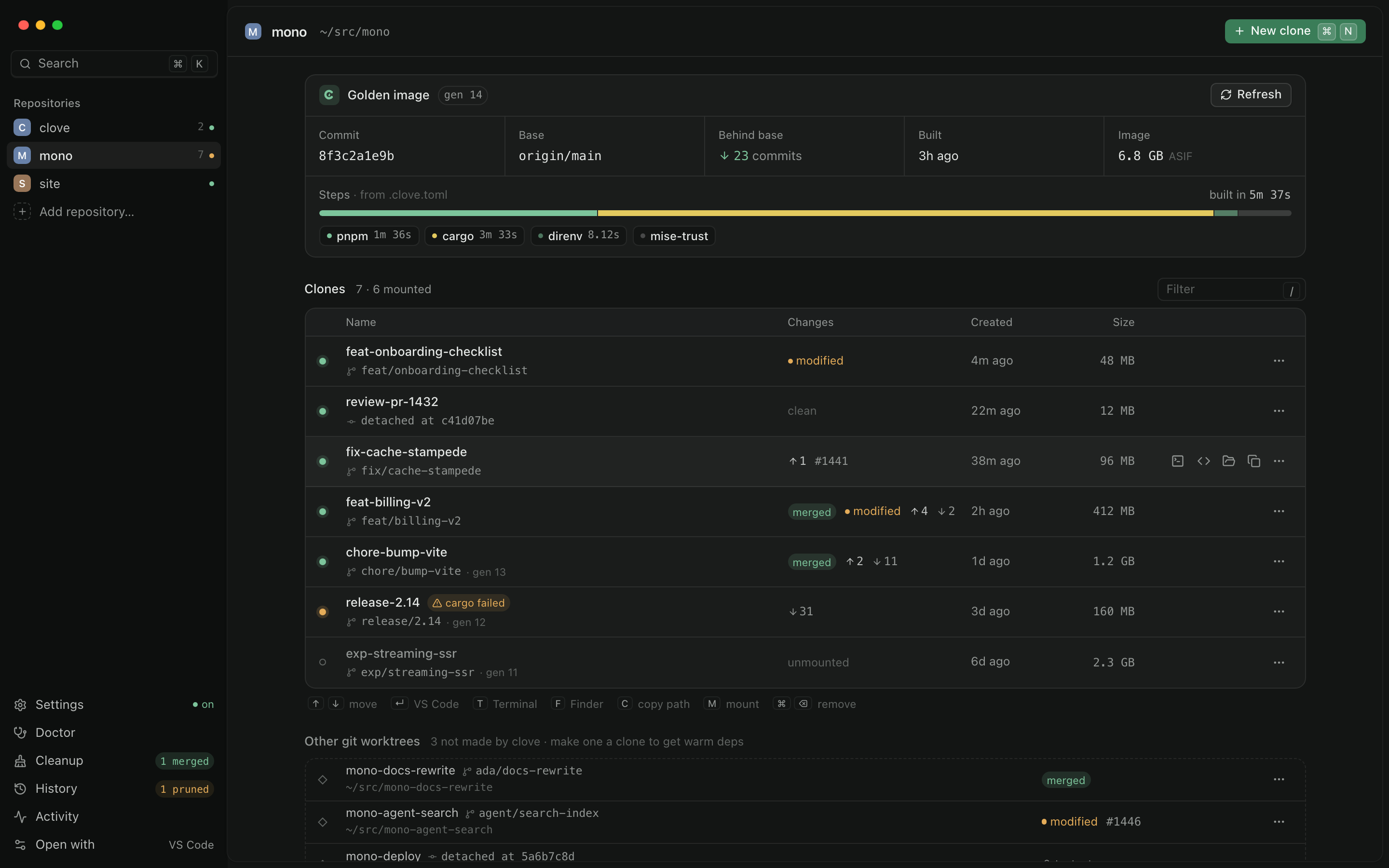
Command line, terminal UI, desktop app.

The same features everywhere, on macOS and Linux. Every command also speaks --json, for scripts and agents.
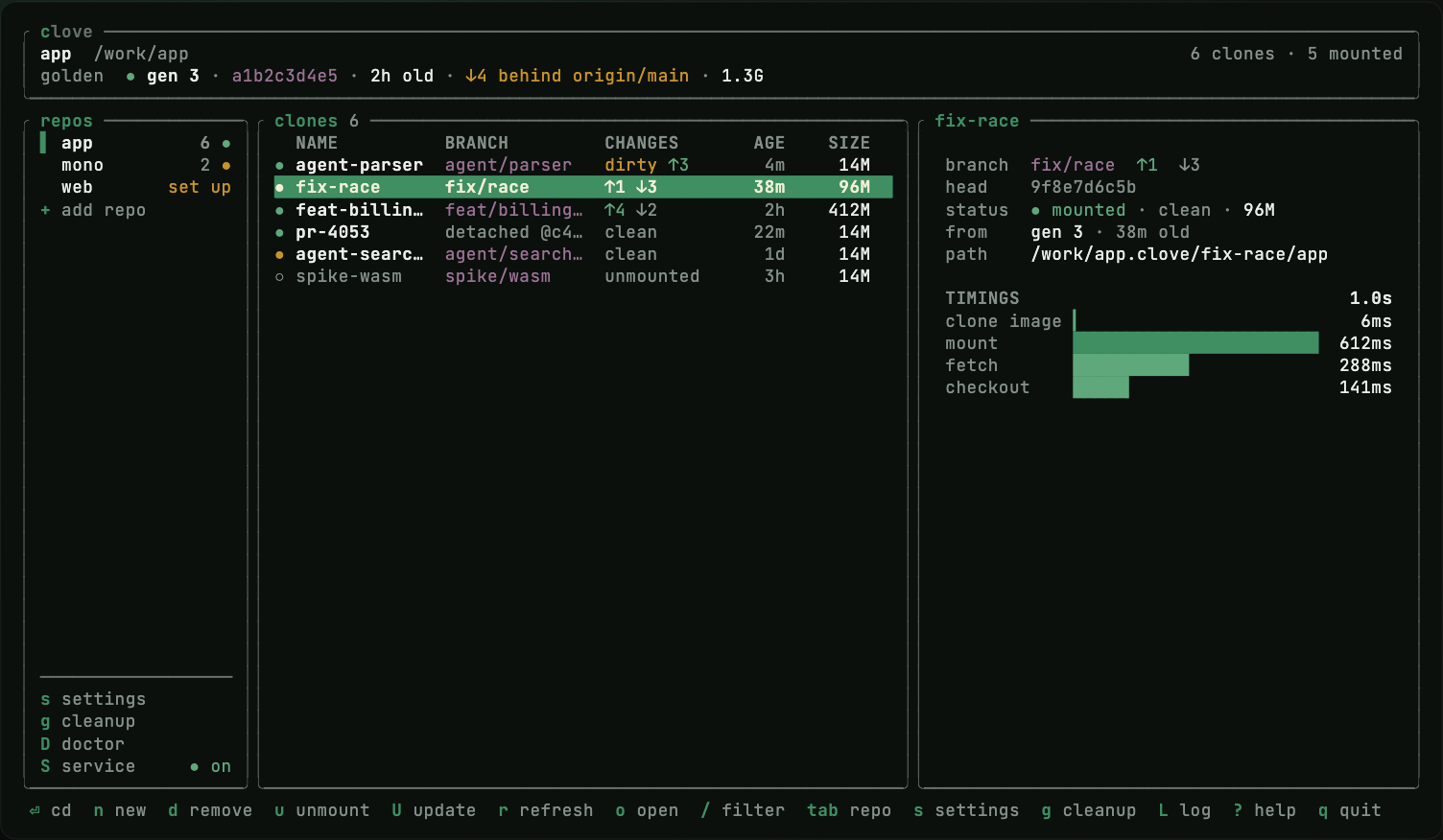
clove · full-screen terminal UI
The clove terminal UI listing clones with their branch, changes, age and size
clove · desktop app
The clove desktop app showing a repository's golden image and clones
~/src/mono
❯ clove ls
NAME CHANGES OWN
feat-login modified 48M
fix-race clean 96M
pr-1432 clean 12M
❯ clove new pr:1441 -x claude
● pr-1441 ready in 0.9s · starting claude

clove update

Up to date, with your agent resolving the conflicts.

Rebases a clone onto the latest base and reruns only the setup steps that changed. When the rebase stops on conflicts, your coding agent resolves them in the clone, from the CLI, the TUI or the app. Claude by default; Codex, or any command, through update.resolver.
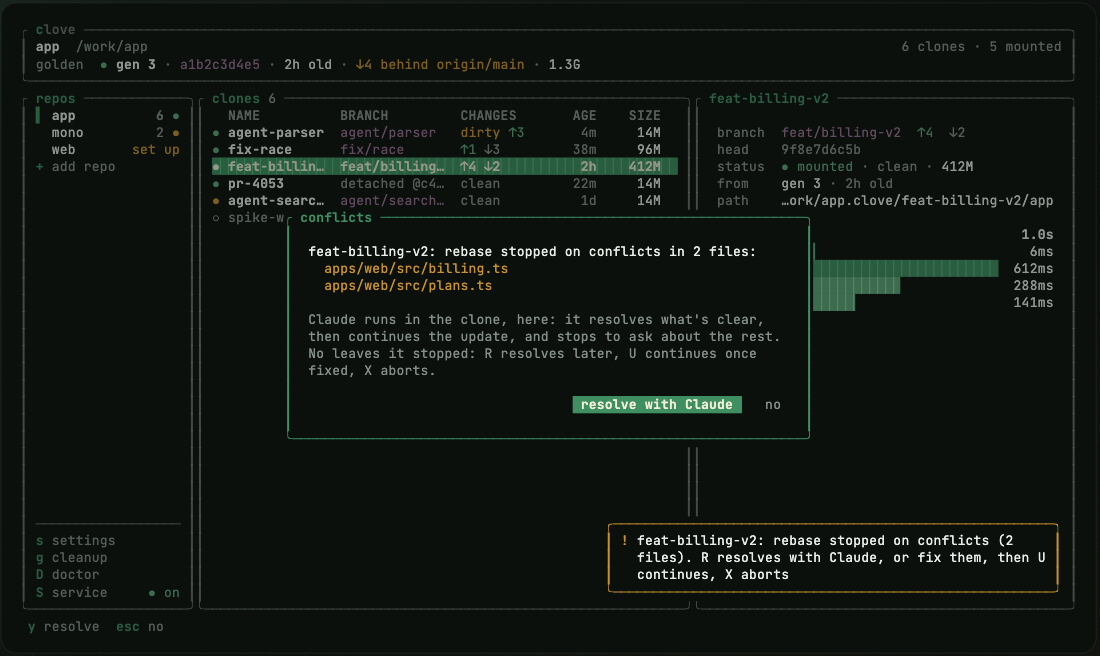
clove · update
The clove TUI offering to resolve rebase conflicts with Claude

clove prune · clove log

Merged pull requests, cleaned up.

Clones whose pull request merged, squash merges included, are removed by hand or automatically. A history keeps every removal, so any branch can come back.
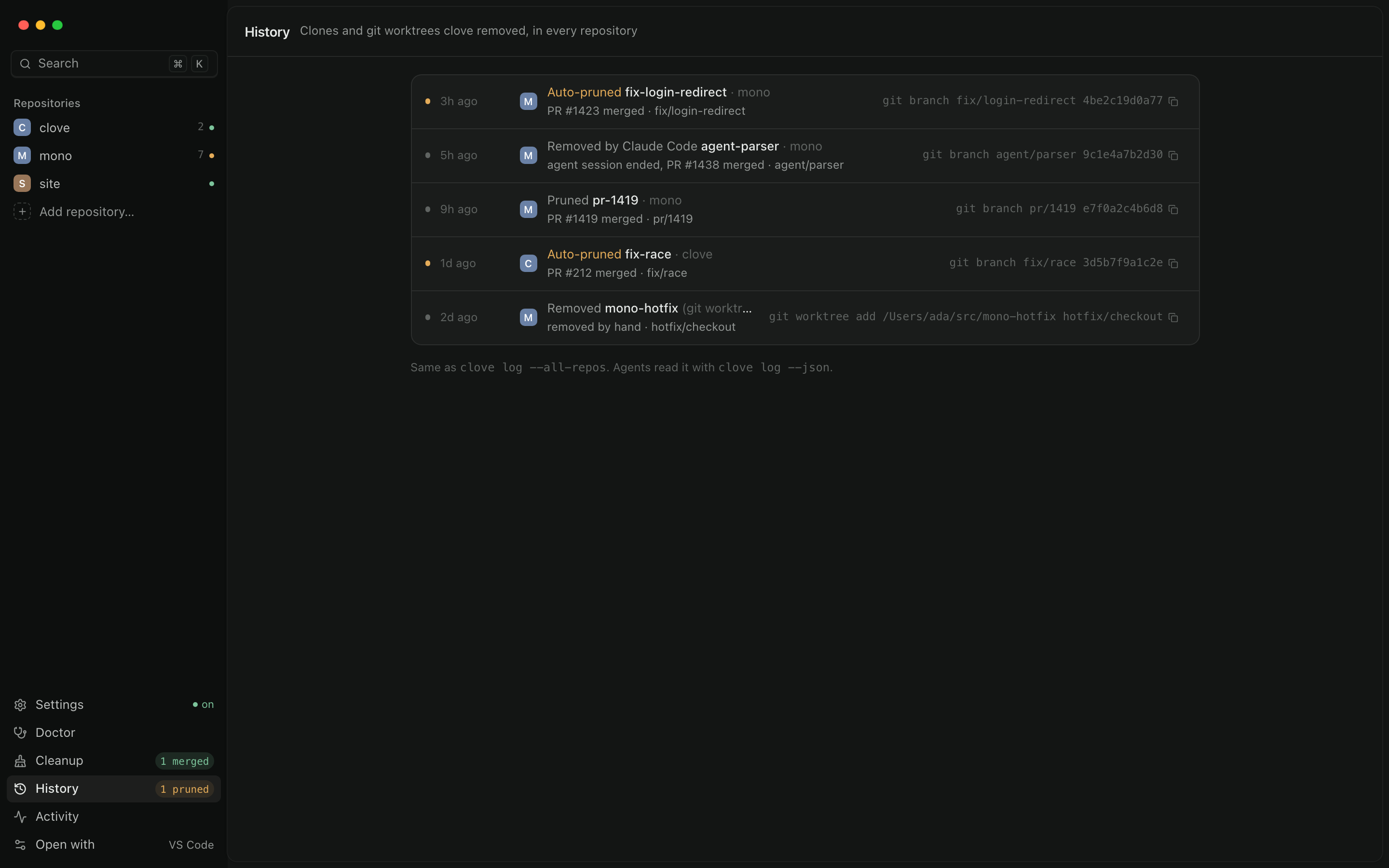
clove · history
The clove app's history of pruned clones

clove agents install

Your agents reach for clove on their own.

One command teaches Claude Code and Codex to use clones, and turns claude --worktree into one.

~/src/mono
❯ clove agents install
✓ Claude Code skill
✓ ~/.claude/CLAUDE.md
✓ worktree hooks
✓ Codex AGENTS.md